Rankings, tournaments
How does the rating system work?
Why is my rating decreasing when I win?
What does ≈ mean in front of the rating?
Rating calculator
What is Grand Prix?
How can I enter tournaments?
Game play
How can I disable ads?
What is skins format?
How to switch to full screen?
How can I set the number of ends for a match?
Subscription
Can I purchase a gift subscription?
What are the benefits of subscribing?
Moderation
How can I report abuse?
Technical
The game does not start after logging in!
System requirements
The rating system
For each match an "expected" score is calculated from the rating difference of the two players (if the ratings are equal, the expected score is 0.5).This expected score is then compared to the actual score of the game (1 for win, 0 for loss, or can be anything in-between for multiple ends).
If the expected score for the player was higher than the real score, the rating drops, if the score is higher than the expected score, the rating is raised.
Formulae:

Where We is the expected score, and dr is the difference in ratings before the match.
The rating change is calculated from the following:
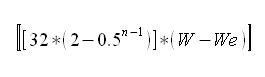
Where W is the score of the event, We is the expected score, n is the sum of the scores by both players.
The system is based on the rating system developed by Prof. Árpád Élő.
Why is my rating decreasing when I win?
This can happen if you play more games, and the final score is "less" than the "expected score".See the rating system description for more detailed explanation.
What does ≈ mean in front of the rating?
The ≈ sign means that you have played less than 20 games, therefore your rating is "provisional". The sign will go away after the 20th game.Ratings are calculated differently if you play against such players. The rating adjustment will be less.
If your opponent has never played a game before (denoted by ---) the rating change will be half of the normal. If your opponent played only 10 games, the rating change will be 3/4 of the normal, if your opponent has played 20 games already, rating change will be normal as described here.
Rating calculator
What is FlyOrDie Grand Prix?
FlyOrDie Grand Prix is an annual competition, in which you score points by getting top 10 placings in any FlyOrDie tournament.
Scoring: 25 for 1st, 18 for 2nd, 15, 12, 10, 8, 6, 4, 2, 1.
Non-subscribed players can also participate, by attending public tournaments, though you have better chance if you can participate in all tournaments.
How can I enter tournaments?
Most of the tournaments are only for subscribed members. Though occasionally there are open tournaments for everyone. Please check the tournament calendar for details.
If you are eligible to enter, all you have to do is attend the tournament room at the given time.
Removing ads
Any kind of advertising is annoying. Unfortunately it is necessary to keep viable a busy site like this.Since several people complained and requested accessing the site without advertising, it was launched a package of premium subscription services.
These are exclusive services made available to subscribers that pay a small fee of USD $25 a year.
Among other services, it is included the possibility to access the site without advertising.
If you are interested, take a look here.
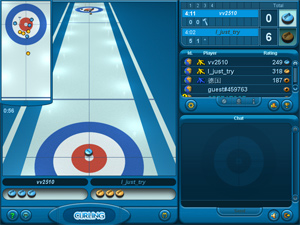
Such an end is said to be won, if the player with the hammer has at least 2 stones counting, or the player without the hammer steals the end.
If neither of these occur, the skin is carried over to the next end.
The skin value for each end: 1 1 2 2 3 3 4 4 5 5.
Full screen mode
Full screen mode is only available for our subscribed members. To activate full screen mode, press the F11 key on your keyboard after you start the game. The game can be also resized to any size. Simply drag the corner of the browser window, and resize it to any size you wish.
Non-subscribed players can only use the zoom levels in the browsers. Zoom is usually applied in most browsers by pressing the CTRL and + key on the numpad simultaneously (CTRL - for zooming out, or CTRL 0 for default zoom).
It might also be needed to maximize the game window, which can be done by clicking on the small icon next to (x) in the upper right corner of the window or pressing ALT+SPACE+X in some browsers.
The resolution of the game will not change, it is simple image zoom, so the resulting image will be little more blurred.
Setting the number of ends per match
It is possible to select the number of ends to play in a match.This setting can be accessed by clicking on the gear icon right at the center of the screen, which is called "Chat and game settings".

To access it click on this icon:
Can I purchase a gift subscription to friends, family members?
You can subscribe a friend, family member, or anyone else, without using their nickname/password.Open the given player's info page, and select the "Gift subscription" option from the menu.
Why should I subscribe?
While we value every user, our subscribed members are given extra consideration.
Subscribers have special privileges and special services. We listen with great care to our subscribed players' suggestions & concerns.
No ads
All kind of advertising is disabled for our subscribed members, so you can play without any disturbance.
Full screen mode
You can play in full screen mode.
Tournaments
Special weekly tournaments for our subscribed members with prizes.
Enter full rooms
Enter rooms which are already "full". There are also preserved spectator places for subscribers.
Easy game access
Change between rooms, game varaints easily.
Toplist and detailed statistics
Our subscribed members can challenge for being on the toplist, compete for prizes and have more detailed statistics.
Player Avatar
Subscribers can upload a photo as their avatar, and they are given a special star next to their names.
Chat extra
Longer chat messages, prominent chat colors, send clickable URL's in chat, use copy/paste to send messages easily.
Special tools
Ability to add other users permanently as "buddies" or "muted" (unwanted users).
Status Icons
You can set your status as "do not disturb" to prevent any disturbances.
Special game settings
Our subscribed members can select how many games they want to play in a single match, and can choose different game settings (different for each game).
Valid for other games
You can enjoy the benefits on all FlyOrDie Games (benefits may differ for other games).
How to report abuse?
The first and most important is that you use the "mute" button for every player whose activity disturbs you.There is also a possibility to report any such activity by using the "report abuse" link on the offending player's play info page. (This feature is only available for our subscribed members, or members who have spent some time already on the games.)

How to clear your browser's cache?
Cache is a local storage area in your browser in which previously viewed HTML pages and images are stored. If a previously viewed Web page is accessed again, the copy is loaded from the cache. With this technique, unnecessary Internet traffic is avoided. However, once there are new versions of files on the server, the cache must be refreshed. To ensure that the current copy is loaded from the server and not from the cache, clear the disk and memory cache in your browser and load the page again.Internet Explorer 9
- Select Tools | Delete browsing history menu item from the main menu.
- Make sure that Temporary Internet files is checked.
- NOTE: DO NOT select Cookies. Delete Cookies removes all the cookies stored on the computer.
- Click Delete.
- Restart browser.
Mozilla Firefox
- Click Tools and select Clear Recent History.
- Make sure that Cache is checked.
- Make sure that Cookies is NOT checked.
- Click Clear Now.
- Restart browser.
Google Chrome
- Click the Customize and control menu. (the wrench icon in the upper-right corner)
- Select Tools.
- Select Clear browsing data.
- Make sure that Empty the cache is checked.
- Make sure that Delete cookies... is NOT checked.
- Click Clear Browsing Data when ready.
Android/Chrome
- Go to Menu > Settings > Privacy.
- Tap CLEAR BROWSING DATA at the bottom of the screen, leave cache selected, then tap Clear.
iOS
- From the home screen, go to Settings > Safari.
- Toward the bottom of Safari's settings screen, tap the buttons for Clear History and Clear Cookies and Data as appropriate. Tap Clear each time to confirm.
Opera
- From the File menu, click to select Preferences.
- From Preferences, click to select History and cache.
- To clear Disk cache, click Empty now.
- Click Ok.
- Restart browser.
Clearing the Java cache
Occasionally you might also need to clear your java cache. Here is how to do it:
- Go to START menu and select Control panel
- Search for Java
- Select the General tab.
- At the "Temporary Internet files" section click on Settings.
- Click on Delete files
- Check all checkboxes if not checked and click on OK
- Close the java control panel windows by clicking on Ok
System requirements
The game can be played on several platforms, including desktop PC (Windows, Linux), iOs devices (iPhone, iPad), OS-X, Android devices, Windows Phone, etc.).
The game requires webGL, which is widely supported in modern browsers for these platforms. For Android, we recommend using Chrome as it offers better WebGL performance in most cases.
An up-to-date graphics driver is strongly recommended for best performance. These drivers can be downloaded from the manufacturer's website: NVIDIA, ATI/AMD, INTEL.